



Integration with Vortex
Checkbox
Fiscalise parts sales, workshop services and returns in Vortex through the Checkbox software cash register, without a separate cash register device.


Vortex + Checkbox
What the integration offers
Online checkout directly in Vortex
Generate and print fiscal receipts on thermal printers
Issue and generate fiscal receipts
No hardware purchase costs
Easy connection management
Configure multiple Checkbox accounts and multiple checkouts or cashiers within one account
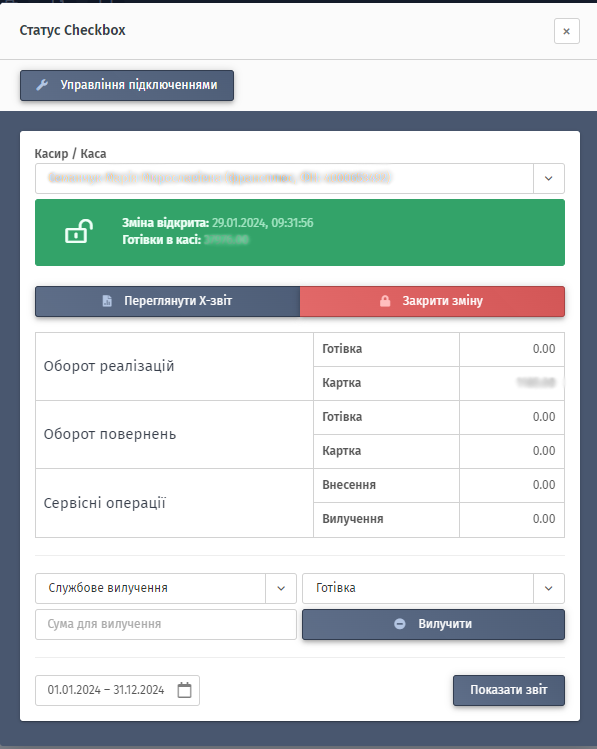
Cash register operations in your usual system
The integration brings together the manager’s cash register tasks and sales workflow. Run everyday cash register operations and issue fiscal documents in Vortex without manually transferring sales data to another application.
- Open and close the cash register.
- Record cash deposits and withdrawals.
- Fiscalise goods, workshop services and returns.
Prepare your Checkbox account
First register with Checkbox and configure your business setup. Create a sales outlet, a cash register and the cashier accounts that will process transactions. The partner registration link is available below.
- Register your company with Checkbox.
- Set up a sales outlet and cash register.
- Create cashier accounts for everyday operations.
Connect the cash register to Vortex
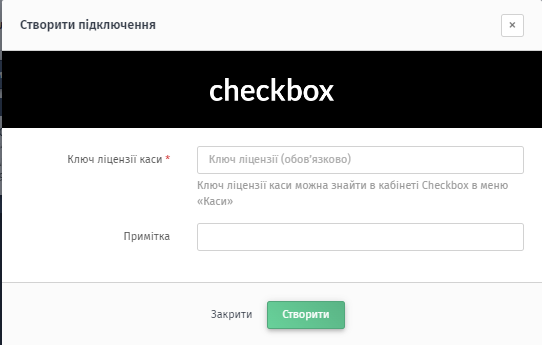
Enter the cash register licence key in the Vortex integration settings and add cashiers using their Checkbox usernames and passwords. Once connected, you can issue fiscal receipts and print them on a thermal printer within your normal sales workflow.
- Add the cash register licence key.
- Connect cashiers using their Checkbox credentials.
- Work with multiple accounts, cash registers and cashiers.